What's new
  • If you have problems with your VIP upgrade send a photo of your bill directly to @Aurora at here, he will assist you in the fastest. Do not worry!!!

BLACK TEAM Game Fate/Grand Order English v2.85.0 MOD FOR ANDROID | MENU MOD | DMG MULTIPLE | DEFENSE MULTIPLE | FORCED WIN | SPEED MULTIPLE | MEGA MOD +10

benzine

New member
Joined
Sep 14, 2020
Messages
7
Points
3
Age
35
game crashes at the "this is a work of fiction" screen, which is weird since it didn't happen at all in the last version and nothing changed on my end.
 

Kevin Hart

Support
Staff member
Support Team
Joined
Oct 4, 2018
Messages
7,132
Points
113
Seems to be faulty. After logging in for the second time, the app doesn't work
I check MOD no problem
Please check storage permission and overlay permission for that app if you have Android 6 or higher. U need turn on it
 

benzine

New member
Joined
Sep 14, 2020
Messages
7
Points
3
Age
35
both storage and overlay permissions are allowed and i'm on android 5 so now what
 

jnfr00

New member
Joined
Apr 23, 2020
Messages
12
Points
3
Age
31
It's crashing for me too when using Bluestacks (Android 5 32bit)

On my MI9 (Android 10) it's working fine
 

DarkHeroXXX

New member
Joined
Mar 8, 2021
Messages
2
Points
3
Age
29
I check MOD no problem
Please check storage permission and overlay permission for that app if you have Android 6 or higher. U need turn on it
I error in Bluestacks. After close Bluestacks, when rebooted, FGO MOD cannot be run. I tried using DW's main FGO version, it didn't have any bugs
 
Last edited:

student1

New member
Joined
Mar 8, 2021
Messages
2
Points
1
Age
23
The new version 2.13 isn't working on emulators for some reason tested on Memu and Bluestacks4. is a fix possible?
 

Hucho

New member
Joined
Feb 25, 2020
Messages
2
Points
1
Age
33
Anyone knows how to fix the issue? After closing the game once it won't open again :(
 

Kevin Hart

Support
Staff member
Support Team
Joined
Oct 4, 2018
Messages
7,132
Points
113
It's crashing for me too when using Bluestacks (Android 5 32bit)

On my MI9 (Android 10) it's working fine
I error in Bluestacks. After close Bluestacks, when rebooted, FGO MOD cannot be run. I tried using DW's main FGO version, it didn't have any bugs
Use other emulator!
The new version 2.13 isn't working on emulators for some reason tested on Memu and Bluestacks4. is a fix possible?
USE Ldplayer bro
1615255204173.png

1615255260107.png
 

naruhuhu

New member
Joined
Jun 29, 2020
Messages
4
Points
3
Age
40
I think the mod works fine with a fresh install but if you had the previous version installed this version breaks your game. Without a fix, prolly have to wait until next patch and hope that fixes this.
 

Dagda

New member
Joined
Mar 9, 2021
Messages
1
Points
3
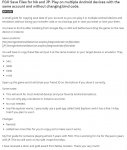
If anyone forgot to bind a tranfer code, you could try export your save files for one instance (or emulator) to other one. it could help for those whose app is not opening or loading. It also helps as a backup of your account.
Try following the guide on the attach file. (You may need to create the "data" folder on the target device/emulator).

I did it long ago to play the base version on my phone and on PC with the same save and I haven't had any problems. It should works for the modded version. The only thing i can't do is resume a quest I started in the other device. so you could only lose AP(?), I don't know if there is another risk.

If it did work for you please bind a tranfer code as soon as possible and write it down in a piece of paper. Finally, credits to the fellow master who made this guide, vanwayne8 =) .

 

Attachments

  • FGO Save Files Share - Play On Multiple Devices.jpg
    FGO Save Files Share - Play On Multiple Devices.jpg
    135.8 KB · Views: 68
Last edited:

Hucho

New member
Joined
Feb 25, 2020
Messages
2
Points
1
Age
33
If anyone forgot to bind a tranfer code, you could try export your save files for one instance (or emulator) to other one. it could help for those whose app is not opening or loading. It also helps as a backup of your account.
Try following the guide on the attach file. (You may need to create the "data" folder on the target device/emulator).

I did it long ago to play the base version on my phone and on PC with the same save and I haven't had any problems. It should works for the modded version. The only thing i can't do is resume a quest I started in the other device. so you could only lose AP(?), I don't know if there is another risk.

If it did work for you please bind a tranfer code as soon as possible and write it down in a piece of paper. Finally, credits to the fellow master who made this guide, vanwayne8 =) .

That's very helpful!
 

naruhuhu

New member
Joined
Jun 29, 2020
Messages
4
Points
3
Age
40
If anyone forgot to bind a tranfer code, you could try export your save files for one instance (or emulator) to other one. it could help for those whose app is not opening or loading. It also helps as a backup of your account.
Try following the guide on the attach file. (You may need to create the "data" folder on the target device/emulator).

I did it long ago to play the base version on my phone and on PC with the same save and I haven't had any problems. It should works for the modded version. The only thing i can't do is resume a quest I started in the other device. so you could only lose AP(?), I don't know if there is another risk.

If it did work for you please bind a tranfer code as soon as possible and write it down in a piece of paper. Finally, credits to the fellow master who made this guide, vanwayne8 =) .

This took me way longer than it should have but I was able to get my account back. Thanks~
 

You should read before giving comments

  • It is BANNED to spam, advertise or transfer to other webs.
  • Crash game, black screen, white screen, can't open game, so on => make sure that you read and followed all instructions of installation at #1. If there is any error, please make a video to record all of your installation steps. Then you upload it into youtube and send comments to us.
  • If Menu Mod not showing, network error, connection error. Please open game & use VPN to use mod.
  • Always use our apk file and obb file to install
  • If you are a VIP Member, please follow license installation instructions in MANAGER LICENSE in web menu
  • If the game runs well, please leave good comments so that this can motivate modders to create better mod versions. If the game has errors, please give inbox us so that we can fix them.
  • Be a polite person before leaving comments!

Game Hack Similar

Tags: Tags action game fate/grand order english android fate/grand order english apk fate/grand order english hack fate/grand order english mod hack fate/grand order english free how to cheat fate/grand order english android how to hack fate/grand order english android
Back
Top