What's new
  • If you have problems with your VIP upgrade send a photo of your bill directly to @Aurora at here, he will assist you in the fastest. Do not worry!!!

BLACK TEAM Game Star Wars™: Galaxy of Heroes v0.38.1908387 MENU MOD | DMGMULTIPLE | DEFENSE MULTIPLE | INFINITE SKILLS | AUTO WIN | OHK GOD MODE | MEGA MOD +7

Recommended Club

bluestacktor

New member
Joined
Sep 24, 2020
Messages
8
Points
3
Age
44
Sorry bro, but this isn't working anymore, tried on LD, MEMU and Bluestacks. Bluestacks was the best coz I could at least install the Toolbox to 'Patch do Android', MEMU and LD couldn't, it tells you to uninstall installer to get stealthy and you can't do nothing about it. But still in Bluestacks you can't run the game, first of all u can't install UNSIGN apk on device, secondly if u installed SIGN apk u get black screen after Capital Games logo.

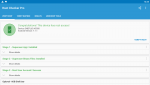
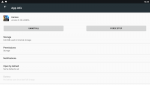
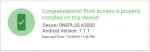
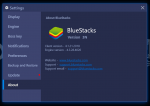
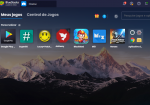
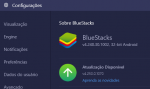
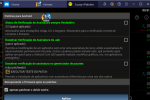
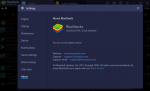
I too have tried all of these options and have confirmed that I get the first black screen and it then goes solid black. No matter how much I try it just won't work. Attached are my settings for LuckyPatcher which work perfectly fine for other apps/games & has for this for multiple updates. Also, I'm on the latest version of Bluestacks, which is 7.1.1 and rooted. The game, as you can see, is also on the latest signed version offered. Permissions are set for storage and screen drawing.

Thanks for any help you can give any of us with how best to resolve this black screen issue.

BM GOH v0.20.643856 - blackscreen video & kickout after a few seconds
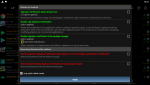
 

Attachments

  • Screenshot_2020.12.20_12.21.58.png
    Screenshot_2020.12.20_12.21.58.png
    217.3 KB · Views: 66
  • Screenshot 2020-12-20 122404.png
    Screenshot 2020-12-20 122404.png
    85.9 KB · Views: 61
  • com.joeykrim.rootcheckp_Screenshot_2020.12.20_12.25.09.png
    com.joeykrim.rootcheckp_Screenshot_2020.12.20_12.25.09.png
    81.1 KB · Views: 57
  • com.bluestacks.settings_Screenshot_2020.12.20_12.25.54.png
    com.bluestacks.settings_Screenshot_2020.12.20_12.25.54.png
    63.4 KB · Views: 58

iargue

New member
Joined
Oct 2, 2020
Messages
10
Points
3
Age
75
I opened something in October and was told to downgrade to android 10.


Maybe posting there will give more visibility. If your VIP, I don't know if you get more support places you can post to, but I would raise them there and not here. I think here is completely ignored except for new updates.
 

Ladlax

New member
Joined
Dec 28, 2020
Messages
15
Points
3
I too have tried all of these options and have confirmed that I get the first black screen and it then goes solid black. No matter how much I try it just won't work. Attached are my settings for LuckyPatcher which work perfectly fine for other apps/games & has for this for multiple updates. Also, I'm on the latest version of Bluestacks, which is 7.1.1 and rooted. The game, as you can see, is also on the latest signed version offered. Permissions are set for storage and screen drawing.

Thanks for any help you can give any of us with how best to resolve this black screen issue.

BM GOH v0.20.643856 - blackscreen video & kickout after a few seconds
maybe the problem is your bs version, try to make a downgrade, thats works for me.
 
Last edited:

bluestacktor

New member
Joined
Sep 24, 2020
Messages
8
Points
3
Age
44
maybe the problem is your bs version, try to make a downgrade, thats works for me.

Just tried this by doing an uninstall of the latest version to install the last version of 3n which runs the same OS. It does the same thing for me. All settings are as they've been for months until this last update which seems to have broken the SIGNED versions through the luckypatcher method. Stops at the Disney logo and kicks me out of the game before proceeding.

Also, I even tried added a rule in my firewall to allow bluestacks in and outbound traffic thinking it could be an issue with that to no avail.
 

Attachments

  • 0.png
    0.png
    30.9 KB · Views: 29
  • 1.png
    1.png
    54.4 KB · Views: 34
Last edited:

Ladlax

New member
Joined
Dec 28, 2020
Messages
15
Points
3

Attachments

  • 1609234300875.png
    1609234300875.png
    598.9 KB · Views: 32
  • 1609234384887.png
    1609234384887.png
    27.5 KB · Views: 36
  • 1609318290881.png
    1609318290881.png
    138.4 KB · Views: 33
  • 1609318566459.png
    1609318566459.png
    430.5 KB · Views: 30
Last edited:

cnvega0912

New member
Joined
Dec 29, 2020
Messages
4
Points
1
Age
50
Anyone else having a problem with events? I get half way through sometimes more and then all buttons disappear and my characters stop attacking...this is different from the known disappearing button issue with the game, because it only happens when I'm using the mod and only in events, nowhere else. I'm using MEmu, unsigned version, with android 5.1. Any help is much appreciated.
 

Attachments

  • Capture.JPG
    Capture.JPG
    116 KB · Views: 58

nartinek

New member
Joined
Dec 17, 2020
Messages
9
Points
3
Age
30
i managed to do it yesterday with my memy emulator but today it doesnt work again its kick me out of my google account , when we use lucky patcher everyone just does the licence thing right?
 

Chaca

New member
Joined
Nov 6, 2020
Messages
3
Points
3
Age
34
UNSIGN

Im using this version: https://cdn3.bluestacks.com/downloa...acks-Installer_4.240.30.1002_amd64_native.exe

and use bstweaker to root BlueStacks Tweaker Official Site

works fine here on bluestacks

I tried this as method as well and the game screen goes black after seeing CG and EA logo briefly at the start.
Only difference, that I can see, is that I have Bluestacks v4.250.0170 and on LP I have applied "disable signature verification in the package manager".

Any idea why it is not working for me. I've been struggling to get the mod to work since I started trying first.
 

Attachments

  • BS1.PNG
    BS1.PNG
    131.3 KB · Views: 47
  • LP1.PNG
    LP1.PNG
    226.9 KB · Views: 56

Ladlax

New member
Joined
Dec 28, 2020
Messages
15
Points
3
I tried this as method as well and the game screen goes black after seeing CG and EA logo briefly at the start.
Only difference, that I can see, is that I have Bluestacks v4.250.0170 and on LP I have applied "disable signature verification in the package manager".

Any idea why it is not working for me. I've been struggling to get the mod to work since I started trying first.
try to install this bs version https://cdn3.bluestacks.com/downloa...acks-Installer_4.240.30.1002_amd64_native.exe
 

Ladlax

New member
Joined
Dec 28, 2020
Messages
15
Points
3
Could u add me on discord? prodiga#8336
Or just please send all the steps here, how it worked for you


1 - backup your BS files (if you want thats optional)
2 - uninstall BS completely
3 - install a previous version of BS, for example I'm using the version: https://cdn3.bluestacks.com/downloa...5b3/x64/BlueStacks-Installer_4.240.30.100.exe
4 - now install bstweaker at the link: https://bstweaker.tk/zip/BSTweaker 6/BSTweaker67010.zip (extract to anywhere)
5 - with bluestacks closed open bstweaker> click on the "root" tab> click "unlock" and wait for the process to load
6 - open the bluestacks just by clicking on the blue "play" symbol> attention of the ADB Server is green> press "Patch" and below the message "Patch: Android: True" will appear> press Install SuperSu> at this moment your BS will be with root access
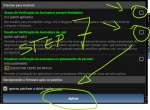
7 - go to BS and install LuckyPatcher, ensure root access, and patch the signature verification (like the image attached)
8 - install SWGOH through the updated official app or playstore> open and log in to your account
9 - install the mod app without uninstalling the original app> open the game
 

Attachments

  • step_7.png
    step_7.png
    141.5 KB · Views: 57
  • tweaker.png
    tweaker.png
    58.4 KB · Views: 52
Last edited:

Sasha Banks

Member
Joined
Dec 13, 2020
Messages
39
Points
8
Age
30
1 - backup your BS files (if you want thats optional)
2 - uninstall BS completely
3 - install a previous version of BS, for example I'm using the version: https://cdn3.bluestacks.com/downloa...5b3/x64/BlueStacks-Installer_4.240.30.100.exe
4 - now install bstweaker at the link: https://bstweaker.tk/zip/BSTweaker 6/BSTweaker67010.zip (extract to anywhere)
5 - with bluestacks closed open bstweaker> click on the "root" tab> click "unlock" and wait for the process to load
6 - open the bluestacks just by clicking on the blue "play" symbol> attention of the ADB Server is green> press "Patch" and below the message "Patch: Android: True" will appear> press Install SuperSu> at this moment your BS will be with root access
7 - go to BS and install LuckyPatcher, ensure root access, and patch the signature verification (like the image attached)
8 - install SWGOH through the updated official app or playstore> open and log in to your account
9 - install the mod app without uninstalling the original app> open the game
Holy ****! It works!
Can I somehow add google account bind to my guest account on my phone?
 
Last edited:

Ladlax

New member
Joined
Dec 28, 2020
Messages
15
Points
3
Holy ****! It works!
Can I somehow add google account bind to my guest account on my phone?
yes, but you need to connect your account with facebook and then you will be able to migrate to your google account.

first go to
1609367284901.png
>>>>
1609367357632.png
>>>>
1609367400450.png
>>>>
1609367460667.png


that was I did
 
Last edited:

Sasha Banks

Member
Joined
Dec 13, 2020
Messages
39
Points
8
Age
30

Ladlax

New member
Joined
Dec 28, 2020
Messages
15
Points
3
I cannot use facebook account, there is a failure to load a page to login. I am using SIGN mod on my phone and it's impossible I think
try install the official app over the mod (without uninstall your current app), this will not erase your current data


You should read before giving comments

  • It is BANNED to spam, advertise or transfer to other webs.
  • Crash game, black screen, white screen, can't open game, so on => make sure that you read and followed all instructions of installation at #1. If there is any error, please make a video to record all of your installation steps. Then you upload it into youtube and send comments to us.
  • If Menu Mod not showing, network error, connection error. Please open game & use VPN to use mod.
  • Always use our apk file and obb file to install
  • If you are a VIP Member, please follow license installation instructions in MANAGER LICENSE in web menu
  • If the game runs well, please leave good comments so that this can motivate modders to create better mod versions. If the game has errors, please give inbox us so that we can fix them.
  • Be a polite person before leaving comments!

Game Hack Similar

Tags: Tags action game black mod game blackmod game blackmod team bmt team game apk hack game hack game mod hack game android hack star wars™: galaxy of heroes free hack star wars™: galaxy of heroes hack mod free how to cheat star wars™: galaxy of heroes hack mod android how to hack star wars™: galaxy of heroes hack mod android star wars™: galaxy of heroes android-1 star wars™: galaxy of heroes androidrepublic star wars™: galaxy of heroes apk star wars™: galaxy of heroes blackmod team star wars™: galaxy of heroes blackmod.net star wars™: galaxy of heroes hack star wars™: galaxy of heroes hack mod android star wars™: galaxy of heroes hack mod apk star wars™: galaxy of heroes hack mod hack star wars™: galaxy of heroes hack mod mod star wars™: galaxy of heroes mod star wars™: galaxy of heroes platinmods
Back
Top