You are using an out of date browser. It may not display this or other websites correctly. You should upgrade or use an alternative browser.
BLACK TEAMGame Star Wars™: Galaxy of Heroes v0.38.1908387 MENU MOD | DMGMULTIPLE | DEFENSE MULTIPLE | INFINITE SKILLS | AUTO WIN | OHK GOD MODE | MEGA MOD +7
Welcome to the Star Wars™: Galaxy of Heroes Club!! Here you can discuss, share tips and strategies for the best teams and upcoming in-game events to watch out and prepare for.
OKAY!
so i tried out the unsigned version just now. Works fine. Works 100% so if you cant get it to work, user error.
>UNINSTALL THE GAME. (im using LdPlayer so click on it and drag to uninstall)
>Go to play store and search SWGOH
>Install the NORMAL GAME AND ONLY THE NORMAL GAME
>Open up the game and just clear out all of the messages (probably not necessary to clear out all the messages and all but i did it to be neat and tidy)
>Go back to home page of LdPlayer
>Close out of all applications in LdPlayer
>Drag the unsigned file onto LdPlayer and you should get a little notifications saying something about parsing or whatever
>Give it a little time to clear out to esnure its all done
>Open up the game and it should be all back to normal on the latest version
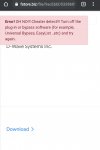
I can't even test this out. I tried using you different web browsers, two different phones. And I keep getting this error. This is some kind of prank....yes? If you don't see it, look at the red boxes on the top.
Do have the same. It works on Nox, but can't install on Samsung A12, running Android 11 (it worked on previous build btw). Can't get it to work. Not with the signed on, nor the unsigned on.
Is it to do with Android build version, or some strange security issues on Samsung devices?
I can't even test this out. I tried using you different web browsers, two different phones. And I keep getting this error. This is some kind of prank....yes? If you don't see it, look at the red boxes on the top.
It is BANNED to spam, advertise or transfer to other webs.
Crash game, black screen, white screen, can't open game, so on => make sure that you read and followed all instructions of installation at #1. If there is any error, please make a video to record all of your installation steps. Then you upload it into youtube and send comments to us.
If Menu Mod not showing, network error, connection error. Please open game & use VPN to use mod.
Always use our apk file and obb file to install
If you are a VIP Member, please follow license installation instructions in MANAGER LICENSE in web menu
If the game runs well, please leave good comments so that this can motivate modders to create better mod versions. If the game has errors, please give inbox us so that we can fix them.