

- Joined
- Jun 15, 2018
- Messages
- 10,344
- Points
- 113
Package name: com.netmarble.mherosgb
MARVEL Future Fight 12.3.1 time_update

| Version: | 12.3.1 |
|---|---|
| Package: | com.netmarble.mherosgb |
| Root needed: | NO |
| Internet required: | YES |
| Size: | 100MB |
| Price: | For VIP Only |
| Support: | Android |
| Categories: | Action Game |
| CHPlay URL: | here |
VIP Features |
|
VIP License Guide
Only follow these steps if this MOD requires a BlackMod license. Game-specific instructions in this post take priority.
- Download your
blackmod.licensefile. See how to download your license. - Check the downloaded filename. If it is
blackmod.license.txt, rename it toblackmod.license. - Open this folder in internal storage:
Android/obb/com.netmarble.mherosgb/If the game folder is missing and your device allows it, create a folder named exactlycom.netmarble.mherosgbinsideAndroid/obb. - Copy
blackmod.licensedirectly into that game folder, not into an extra subfolder. Android 11 and newer: access toAndroid/obbis restricted. Follow the Android 11+ license installation guide. - Open Settings > Apps > your game > Permissions and allow only the permissions required by the game instructions. Not every game needs storage or phone access.
- If the game requires it, allow Display over other apps (screen overlay). See the screen overlay permission guide.
Open the game again. If the license is not recognized, check the filename, folder location and game-specific instructions before contacting support.
Playing on a Windows PC
Some users prefer playing our MODs on a Windows PC and ask which emulator works best. We recommend LDPlayer 9, as all VIP MODs that support emulators are tested with it.
- Download and install LDPlayer 9 on your PC.
- Then follow the phone instructions above inside LDPlayer to install and use the license.
Credits: Legend - BlackMod Team
if your phone is ROOTED. PLEASE HIDE ROOT before play game
HOW TO HIDE ROOT WITH MAGISK APP => CLICK HERE
Game Description
An epic blockbuster action-RPG featuring Super Heroes and Villains from the Marvel Universe! The Avengers, Guardians of the Galaxy, Inhumans, Defenders, X-Men, Spider-Man, and more! Over 200 characters from the Marvel Universe are available to play! S.H.I.E.L.D.’s very own director, Nick Fury, has sent an urgent message from the future... the convergence is destroying the world as we know it! Prepare to defend your...Read moreShow less
The Avengers, Guardians of the Galaxy, Inhumans, Defenders, X-Men, Spider-Man, and more!
Over 200 characters from the Marvel Universe are available to play!
S.H.I.E.L.D.’s very own director, Nick Fury, has sent an urgent message from the future... the convergence is destroying the world as we know it! Prepare to defend your universe!
Recruit your favorite characters, complete missions, and compete with other players to be the greatest hero and save your world.
Collect over 200 Marvel Super Heroes and Super Villains to assemble your ultimate team.
- Level up your characters and their gear to unleash their full powers!
- Build classic teams like the Avengers or X-Men to take advantage of special bonus effects.
- Choose from hundreds of Uniforms to increase your character’s powers and perfect your hero's look.
Upgrade powerful characters in Epic Quests!
- Get everyone’s favorite Super Heroes, from Captain Marvel to Doctor Strange, and level them up while playing thrilling Epic Quests.
- Unleash each character’s unique super powers as you make your way through various missions. Blast enemies with Iron Man’s Unibeam and bash opponents in the name of justice with Captain America’s shield!
- Experience even more thrilling action in PvP Arena modes, where you can bring your best team to take on the world.
Team up with friends and overcome incredible in-game challenges.
- Take a friend’s character with you when you go into a mission for emergency assistance!
- Join an Alliance and make friends. Compete with other Alliances in Alliance Conquest and take home the glory for your own team.
FAQ - Read References First
2. Tap the download link. You will be redirected to a confirmation page
3. Scroll to the bottom and tap “Download NOW”.
4. You will be redirected to the download page to download the APK.
2- Download modded APK (Sign)
3- Install modded APK
4- Enjoy =)
2- Your device must be full patched. How to? Read: Tutorial in Here
3- Download and install unsigned APK.
Google+ login possible? Yes.
Facebook login possible? Yes.
Specific Game Account login possible (for example: HIVE)? Yes.
1- Download obb.zip / data.zip and extract it
2 - Copy the game OBB folder (com.game.package) to: Android/obb on your device
- Or Copy the game Data folder (com.game.package) to: Android/data on your device
3- Download and Install mod APK
5- Enjoy
If ur phone use Android 11. Please read it : https://blackmod.net/threads/25242/
Disable Signature Verification with Core Patch: Read tutorial in here
[Android 6.0 or Later] Need enable Permissions. Go to Settings > Manage Applications > Select App > Permissions > Grant Permission
If game have menu mod. Need enable Appear On Top (Or Allow Floating Windows) Permission
1. Find your game packpage name, Use an app on your phone.
- Install Package Name Viewer 2.0 from the Play Store.
- Scroll through the app list to find the app for which you need the package name.
You can also use the search button to quickly look for a particular application or game.
The package name is listed just under the name of app.
2. Backup your data .
- Open file manager find Android forder !
- Go to Android forder you will see two Forder name "data" and "obb" .
- Open "data" forder and find your packpage name game you want to Kepp Account (Example: com.tencent.ig).
- Rename it to whatever you like ( Example: com.tencent.ig -> rename it to com.tencent.ig.keepdata)
3. Uninstall Old Version and Install New Versions .
4. Back to file manager, Unrename your packpage you renamed in step 2 ( Exam : "com.tencent.ig.keepdata" -> rename it to "com.tencent.ig").
5. Open Game and Enjoy MOD With Your Save Data !
2. Apps (Or Appmanagement).
3. Find Your Game.
4. Press It And Chosse.
5. Appear On Top (Or Allow Floating Windows) Permission.
6. Turn On Permission .
7. Enjoy MOD !!!

fajarfuzhu
New member
- Joined
- Aug 3, 2018
- Messages
- 13
- Points
- 3
Sent from Xiaomi Pad 5 using BlackMarket App
Varianda21
New member
- Joined
- Jul 11, 2020
- Messages
- 3
- Points
- 3
- Age
- 31
- Joined
- Jul 25, 2018
- Messages
- 29
- Points
- 18
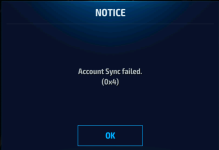

What method you're trying!! . . .may i know why it shows account sync fails when i try to bind to my account?
Using LDPlayerView attachment 36614

axexiv15
New member
- Joined
- Sep 15, 2023
- Messages
- 2
- Points
- 3
im using google play ..What method you're trying!! . . .
Google method won't work while using signed apk.im using google play ..
Use another login method instead
Varianda21
New member
- Joined
- Jul 11, 2020
- Messages
- 3
- Points
- 3
- Age
- 31
What method you used for sync account?Google method won't work while using signed apk.
Use another login method instead
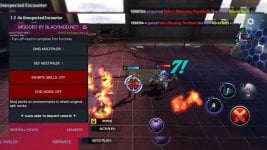

2cool4you
New member
- Joined
- Oct 29, 2023
- Messages
- 7
- Points
- 3
Thanks for Facebook login method! It works!MOD-WORKING
Android 11 physical: Working ✓
Android 7/9/10 Virtual: Working ✓
RUN-NOTES.
For Login Method
Use "Facebook Method"
Remove Facebook application and use chrome as default browser.
View attachment 36633
Review
2cool4you
New member
- Joined
- Oct 29, 2023
- Messages
- 7
- Points
- 3
I am using vphone gaga and managed to use the account linked to Google by installing and logging in original game first.how to log in using google?
Renaming the game folders in
Android/obb
Android/data
I just added an extra letter in the beginning of those folders.
After that uninstalling the game and installing the mod APK.
Renaming the folders back to their original name.
Started the game it gave me option to use my old account that was linked to Google.

boteddy28
Member
- Joined
- Nov 6, 2023
- Messages
- 29
- Points
- 18
can i do this to emulator also?I am using vphone gaga and managed to use the account linked to Google by installing and logging in original game first.
Renaming the game folders in
Android/obb
Android/data
I just added an extra letter in the beginning of those folders.
After that uninstalling the game and installing the mod APK.
Renaming the folders back to their original name.
Started the game it gave me option to use my old account that was linked to Google.
poonlapfai3317
Member
- Joined
- Nov 1, 2023
- Messages
- 39
- Points
- 8
2.blackmod.license.txt Rename blackmod.license
3.search android 13 obb
4.blackmod.license>(android>obb>com.netmarble.mherosgb)
Sent from Galaxy A53 5G using BlackMarket App
- Joined
- Jun 15, 2018
- Messages
- 10,344
- Points
- 113
