What's new
  • If you have problems with your VIP upgrade send a photo of your bill directly to @Aurora at here, he will assist you in the fastest. Do not worry!!!

BLACK TEAM Game Shining Beyond SEA v1.0.35 MOD FOR ANDROID | MENU MOD | DMG MULTIPLE | DEFENSE MULTIPLE

yanzbeb

New member
Joined
Sep 11, 2018
Messages
3
Points
1
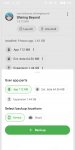
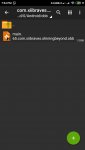
Disclaimer: This method is quite complicated but it works in my phone. If you don't want to be complicated, wait for the fix from the modder or just play the original version.<br /><br />I explained the simplified version of the account switching guide in the previous page already. Since you did not understand, I will state the slightly longer version instead,<br /><br />1. Install the Playstore version of SB first > login with the first account<br />2. Exit game > open Swift Backup > search for SB app > click Backup > select "Data" (NOT "App", "Ext. Data" and "Expansion")<br />3. Backup it to the device or cloud, whatever you want<br />4. Open the Playstore version of SB again > log out of the first account > login to the second account<br />5. Repeat step no. 2 but the backup the "Data" to a different place. If previously you chose to backup the first account's "Data" to the device, now choose to backup the second account's "Data" to cloud. This is so that the two backups will NOT BE REPLACED<br />6. Uninstall SB Playstore version > install SB mod version<br />7. After installing the mod version> open Swift Backup > look for the SB app > restore "Data" SB that was backed up earlier.<br />8. Open the SB mod game<br />9. To switch account, open Swift Backup again > restore another "Data" from another backup location<br /><br />This method only works for 2 accounts. <br /><br />If you have more than 2 accounts, it is recommended that you backup the contents of the / Swiftbackup folder using a file manager so that the backups are NOT REPLACED. Restore the folder if you want to login to another account.

where Data?
 

Attachments

  • cacheei_1607578822247.jpg
    cacheei_1607578822247.jpg
    179.9 KB · Views: 58
_____
Sent from ASUS_X00TD using BlackMarket App

Zelael

New member
Joined
Jan 31, 2019
Messages
5
Points
3
Age
39
Location
Indonesia
Turn off wifi or mobile data first, click the game then press home button immediately, turn on wifi/mobile data then wait for the BMT menu to appear
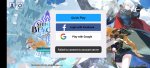
I tried your method it did go load but it always says failed toconnect account server
 

Kny19900

New member
Joined
Oct 14, 2019
Messages
12
Points
3
Age
35
Location
Malaysia
Sometimes you can't even launch the game,after few seconds of black screen then that is it...tried on different devices it still same even play with VPN on...lol
 

You should read before giving comments

  • It is BANNED to spam, advertise or transfer to other webs.
  • Crash game, black screen, white screen, can't open game, so on => make sure that you read and followed all instructions of installation at #1. If there is any error, please make a video to record all of your installation steps. Then you upload it into youtube and send comments to us.
  • If Menu Mod not showing, network error, connection error. Please open game & use VPN to use mod.
  • Always use our apk file and obb file to install
  • If you are a VIP Member, please follow license installation instructions in MANAGER LICENSE in web menu
  • If the game runs well, please leave good comments so that this can motivate modders to create better mod versions. If the game has errors, please give inbox us so that we can fix them.
  • Be a polite person before leaving comments!

Game Hack Similar

Tags: Tags action game hack shining beyond sea free how to cheat shining beyond sea android how to hack shining beyond sea android shining beyond sea android shining beyond sea apk shining beyond sea hack shining beyond sea mod
Back
Top