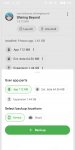
Disclaimer: This method is quite complicated but it works in my phone. If you don't want to be complicated, wait for the fix from the modder or just play the original version.<br /><br />I explained the simplified version of the account switching guide in the previous page already. Since you did not understand, I will state the slightly longer version instead,<br /><br />1. Install the Playstore version of SB first > login with the first account<br />2. Exit game > open Swift Backup > search for SB app > click Backup > select "Data" (NOT "App", "Ext. Data" and "Expansion")<br />3. Backup it to the device or cloud, whatever you want<br />4. Open the Playstore version of SB again > log out of the first account > login to the second account<br />5. Repeat step no. 2 but the backup the "Data" to a different place. If previously you chose to backup the first account's "Data" to the device, now choose to backup the second account's "Data" to cloud. This is so that the two backups will NOT BE REPLACED<br />6. Uninstall SB Playstore version > install SB mod version<br />7. After installing the mod version> open Swift Backup > look for the SB app > restore "Data" SB that was backed up earlier.<br />8. Open the SB mod game<br />9. To switch account, open Swift Backup again > restore another "Data" from another backup location<br /><br />This method only works for 2 accounts. <br /><br />If you have more than 2 accounts, it is recommended that you backup the contents of the / Swiftbackup folder using a file manager so that the backups are NOT REPLACED. Restore the folder if you want to login to another account.